TikTok is full of videos worth keeping: recipes, tutorials, music clips and your own best posts. The problem is that when you save a video through the app, it comes with a moving TikTok logo and username stamped on it. That is fine for personal viewing, but it looks messy if you want to re-edit your own clips or build a clean video library.
The good news is that you can save TikTok videos without the watermark in less than a minute, using just your browser.
Why Remove the TikTok Watermark?
- Cleaner playback: No logo bouncing around the screen.
- Easier editing: If you are a creator, you can reuse your own clips in other editing apps without cropping.
- Better archiving: Keep a tidy backup of your own content in case your account has problems.
- Offline viewing: Watch your saved clips anywhere, even without internet.
The Easiest Way: Use an Online TikTok Downloader
Browser-based tools are the fastest option because there is nothing to install. One popular choice is SnapTik, a free TikTok downloader that works on phones, tablets and computers. It supports MP4 video in HD, MP3 audio, photo slideshows and Stories.
Step-by-Step Guide
- Copy the video link. Open TikTok, tap the Share button on the video you want, and choose Copy Link.
- Open the downloader. Go to SnapTik in any browser on iPhone, Android, Windows or Mac.
- Paste the link. Tap the Paste button, or press and hold in the box to paste the URL.
- Choose your format. Pick Video for MP4, Mp3 for audio only, or Slideshow and Story for those types of content.
- Tap Download. Your file is saved to your device, ready to watch or edit.
Tips for the Best Results
- Use the full share link. Short or broken links may not load.
- Check your storage. HD videos can take up space, so clear some room first.
- On iPhone, use Safari to download. Files appear in the Files app or the Downloads folder.
- Update your browser. An up-to-date browser avoids most loading and download errors.
- Avoid pop-up ads. Only click the official Download button, and close any unrelated pop-ups.
Downloading MP3 Audio from TikTok
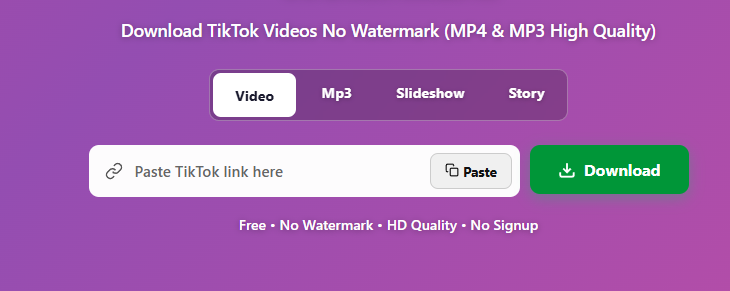
Sometimes you only want the sound: a trending track, a voiceover, or a clip you want to use as a ringtone. Choose the Mp3 tab, paste the link, and download the audio only. This is much smaller than a full video.
Is It Legal and Safe?
Downloading your own videos is completely fine. For other people’s videos, always respect the creator’s rights. Save content for personal use only, and do not re-upload or sell someone else’s work without permission. If you want to share a video, give credit or ask the creator first.
On safety, never enter your TikTok password on a downloader site. A proper tool only asks for the video link, nothing else.
Final Thoughts
You do not need to install extra apps to save TikTok videos cleanly. With a browser-based tool like SnapTik, you copy the link, paste it, and download in seconds, in HD, with no signup. Whether you are backing up your own content or saving a clip for offline viewing, it is one of the simplest methods available.
Frequently Asked Questions
Does this work on iPhone and Android?
Yes, it works in any modern browser on iOS, Android, Windows and macOS.
Can I download only the audio?
Yes, select the Mp3 option to save just the sound.
Do I need an account?
No. Paste the link and download.